
We’re excited to introduce the latest update to the side panel. Please note that the previous Requests panel hasn’t been removed; it’s now conveniently nested within this new panel for easier access. This enhanced panel brings several new features and improvements.
Refresh and Close Controls
The panel includes a Refresh icon  that allows you to update data within the currently selected position tab without needing to reload the entire page. This ensures you’re always viewing the most up-to-date information with minimal disruption.
The Close (X) icon  collapses the panel. Once closed, a sidebar icon remains visible, allowing you to quickly reopen the panel at any time.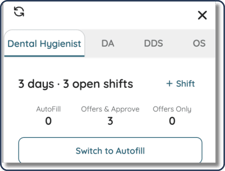
Position Tabs
The Position Tabs follow a familiar design, consistent with the Blocked Professionals view in Settings, with a more streamlined layout.
Each tab represents a specific role and displays relevant information about shifts, requests, and available professionals for that position. When opened, the panel defaults to the Dental Hygienist tab.
Inactive tabs appear as abbreviated labels and expand to their full name when selected. A red indicator dot will appear on a tab when there are pending requests that require review for that position.
Open Shifts
This section provides a summary of your open shifts, including:
- The number of days with open shifts
- The total number of open shifts across those days
You’ll also find a + Shift call-to-action (CTA), which directs you to the shift creation flow. The position selected in the current tab will automatically be pre-filled in the creation form.
Additionally, open shifts are categorized by fulfillment type. The Switch to Autofill CTA will appear only when there are shifts in either Open & Approve or Offer Only status.
Requests Available
This section displays all incoming requests, organized by the following cohorts:
- Favorited by Practice
- Previously Worked with Practice
- Worked with Your Organization
This section directly corresponds to the red indicator shown on the Position Tabs, signaling when there are requests ready for review.
Professionals Available
Here, you’ll find a list of available professionals, grouped by cohort. These individuals are eligible to receive offers for one or more open shifts within the selected position.
To send offers:
- Select the desired cohorts using the available checkboxes
- Click the Send Offers CTA
Offers will then be sent to the selected professionals.
Search for Professionals
The Search for Professionals CTA takes you to the dedicated search page, with the currently selected position automatically applied as a filter. This allows for a more targeted and efficient search experience.
Bulk Shift Management Panel
The Review Requests functionality remains consistent with the original side panel experience, with one key improvement: it is now scoped to the currently selected position tab, rather than displaying requests across all positions.
Additionally, new icons have been introduced to clearly indicate which cohort(s) each professional belongs to.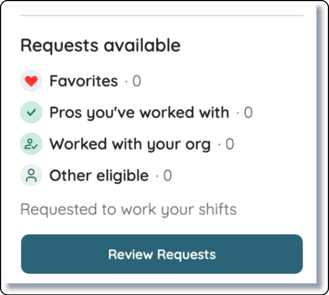
Review Requests Panel
The Bulk Switch to Autofill modal enables you to select multiple shifts and convert them to Autofill in a single action.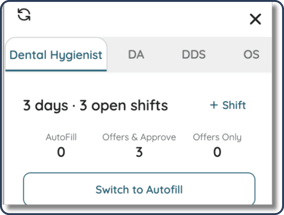
For added convenience, a Select All option is available at the bottom of the modal, making it easy to apply changes to all visible shifts at once.